The more I work with Jetty, the more I love it. It’s really amazing to have a web server in your hand that you can modify at will. I like being able to include a light web server in my application even on tiny programs.
Here is all you need : Jetty.
The objective of this example is to create a fully working web server in as few lines as possible..
The project structure :
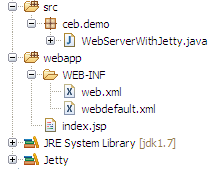
The main :
package ceb.demo;

import org.eclipse.jetty.server.Server;
import org.eclipse.jetty.webapp.WebAppContext;

public class WebServerWithJetty {

    public static void main(String[] args) throws Exception {

        WebAppContext context = new WebAppContext();
        context.setDefaultsDescriptor("webapp/WEB-INF/webdefault.xml");
        context.setDescriptor("webapp/WEB-INF/web.xml");
        context.setResourceBase("webapp/");
        context.setContextPath("/");

        Server server = new Server(10000);
        server.setHandler(context);
        server.start();
        server.join();

    }

}
Some explanations :
- The default descriptor (
webdefault.xml) is set because I want to be able to override the one which comes by default with Jetty. This file defines the configuration needed for a default web application. If you don’t specify yours then Jetty load his own from this location org.eclipse.jetty.webapp.webdefault.xml. If you look inside, you find the configuration of the servlet which handle static content, the servlet for jsp files and few more parameters.
- The descriptor (
web.xml) contains your own settings, your servlets, filters…
- The resource base defines the path to your webapp files (static content or jsp source files).
- The context path is the prefix of your application.
- The last lines are straightforward, they define the listening port of your application.
The content of the web.xml file (empty now) but it’s here you will insert your servlet settings :
<?xml version="1.0" encoding="UTF-8"?>
<web-app xmlns="http://java.sun.com/xml/ns/j2ee" xmlns:xsi="http://www.w3.org/2001/XMLSchema-instance"
xsi:schemaLocation="http://java.sun.com/xml/ns/j2ee http://java.sun.com/xml/ns/j2ee/web-app_2_4.xsd" version="2.4">

<welcome-file-list>
<welcome-file>/index.jsp</welcome-file>
</welcome-file-list>

</web-app>
webdefault.xml reference.
The index.jsp file :
<%@ page language="java" contentType="text/html; charset=ISO-8859-1"
    pageEncoding="ISO-8859-1"%>
<!DOCTYPE html PUBLIC "-//W3C//DTD HTML 4.01 Transitional//EN" "http://www.w3.org/TR/html4/loose.dtd">
<html>
<head>
<meta http-equiv="Content-Type" content="text/html; charset=ISO-8859-1">
<title>Insert title here</title>
</head>
<body>
Hello world !
</body>
</html>
Now, you will be able to serve static and dynamic content locate in your webapp directory. Your application is accessible from url : http://localhost:10000/
In a future post, you will see how to add servlets, filters to change the default behavior of this application.


